Hot Topic is a U.S.-based specialty retailer known for its strong connection to pop culture and alternative fashion. It offers a wide range of band-related apparel and accessories, including T-shirts, hoodies, and collectibles featuring rock, punk, and metal artists. The brand also sells officially licensed merchandise from movies, television shows, anime, and video games, including popular franchises such as Marvel, Disney, and Japanese anime. In addition, Hot Topic features alternative fashion styles such as gothic, emo, punk, and streetwear, offering clothing, jewellery, bags, and lifestyle products for self-expression. With over 600 stores across the U.S. and an online platform, it regularly releases limited editions, collaborations, and seasonal promotions.
Note:
- Hot Topic Gift Cards [US] sold in SEAGM are region-restricted.
- All purchases on SEAGM are final. Once delivered, they cannot be returned, exchanged, or refunded.
Step 1: Once your purchase from SEAGM is completed, log in to your account and retrieve your eGift Card from the “My Cards” section.
Step 2: Visit the Hot Topic website, log in to your account, select the items you wish to purchase, and proceed to checkout via your cart.
Step 3: At the checkout page, locate the “Promo Code” field.
Step 4: Enter the code purchased from SEAGM and click “Apply.”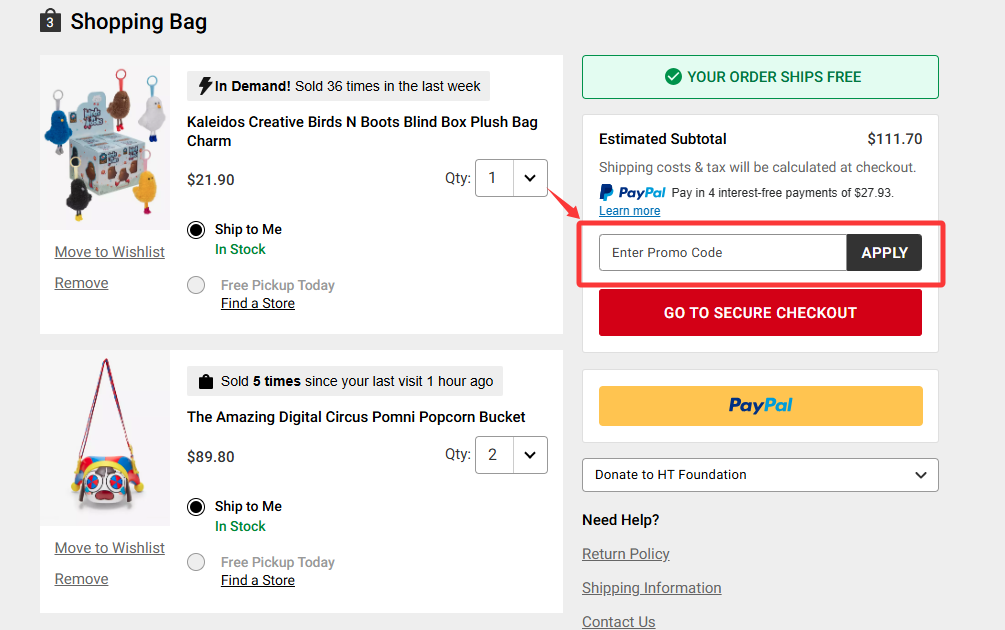
Step 5: Once the code is applied, the discount will be reflected in your order total. Please pay the remaining balance and complete the checkout process as usual.
Note: This gift voucher is valid for one-time use only. Any unused balance will not be refunded.
Thank you.
Visit the SEAGM Support site for quick answers and guides.
Need support? Contact our Customer Support via LiveChat .